
You've invested in a PPM tool. Maybe it's Planview PPM Pro, AdaptiveWork, or Portfolios. Your teams are using it, leadership is pulling reports from it, and on paper, you have visibility into your portfolio.
But here's the problem: if your delivery teams are living in Jira, Azure DevOps, Tricentis Tosca, or ServiceNow, and none of those tools are connected to your PPM platform, the data you're making decisions on is already out of date.
This is one of the most common and most underestimated challenges we see in organizations that have done everything right on the PPM side. The tool is configured, adoption is solid, and processes are in place. But the data flowing into it is manual, delayed, or both. Someone is copying statuses between systems, exporting spreadsheets, or worse, just not updating anything and hoping no one notices.
Planview Hub was built specifically to solve this.
Planview Hub: The Missing Link in Your Toolchain
Planview Hub is an integration platform designed for enterprise software delivery organizations. It's not a replacement for your PPM tool, ALM tool, or ITSM platform. It's the layer that connects them all, so data flows automatically, accurately, and in real time. And it's not limited to Planview tools on either side. Hub can connect non-Planview applications to other non-Planview applications, making it useful well beyond the Planview ecosystem.
Out of the box, Hub ships with 60+ pre-built connectors. For organizations in the Planview ecosystem, that includes native connections to Portfolios, PPM Pro, AdaptiveWork, and Broadcom Clarity. On the delivery side, it covers tools such as Jira, Azure DevOps, ServiceNow, Tricentis Tosca, and GitHub, among many others. If you're running something that isn't covered, Hub's Universal Connector handles API and database integrations for everything else.
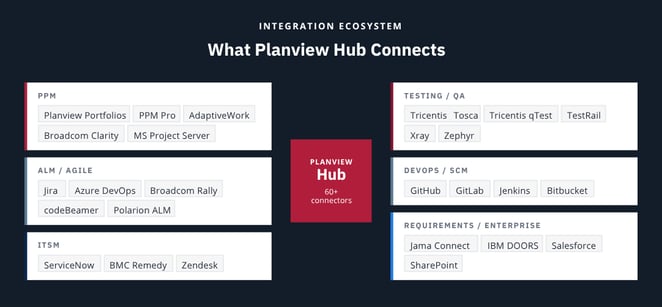
Setup is no-code, administration doesn't require a developer, and the platform runs 500,000 tests per day to make sure every connector stays operational as tools update and APIs change.
What This Actually Means for Portfolio Visibility
The promise of PPM is visibility: knowing what's in flight, where things stand, where resources are stretched, and where risk is building. But that visibility is only as good as the data behind it.
When delivery teams are working in tools that aren't connected to your PPM platform, portfolio data doesn't update until someone manually bridges the gap. That might mean a weekly status meeting, an exported spreadsheet, or a project manager spending hours on data entry instead of on actual project work.
Hub closes that gap. When a work item is updated in Azure DevOps, the change is automatically reflected in your portfolio tool. When a defect is logged in Tosca, it flows to the right place without anyone chasing it. Teams stay in their preferred tools, and leadership gets accurate data without the administrative overhead.
We're seeing this play out with customers who are connecting their ADO and Tosca environments through Hub, with plans to extend that integration into portfolio updates as their usage matures. The initial win is cleaner test data and fewer manual handoffs. The longer-term win is a portfolio view that actually reflects what's happening on the ground.
Why Building Your Own Integration Usually Backfires
When organizations realize they have an integration problem, the first instinct is often to build something. An internal team writes a script, maps the fields, and gets two tools talking to each other. It works, until one of the tools updates its API, a key team member leaves, or you need to add a third tool to the mix.
The math on homegrown integrations tends to look fine at the start and get expensive fast. Organizations using model-based integration through Hub report:
- 90% time saved on integration maintenance
- 75% faster integration setup compared to building custom solutions
- 96% reduction in the number of mappings required
A single administrator can manage integrations across hundreds of projects without writing a line of code. The opportunity cost of DIY matters too: every hour a developer spends maintaining a custom integration is an hour not spent on the work your business actually needs them doing.
What to Think About Before You Implement
Hub is powerful, but getting the most out of it requires some groundwork. A few questions worth asking before you start:
- Do you have a clear source of truth for each data type? Hub keeps tools in sync, but if there's no organizational agreement on where a work item lives and which system owns it, sync conflicts will surface quickly.
- Are your data fields standardized enough to map? Tools that have been heavily customized over time may need some cleanup before integration is straightforward.
- Which tools actually need to be connected, and in which direction? Not every integration needs to be bidirectional. Knowing what you need data to do is the starting point for configuring Hub correctly.
These questions tend to uncover broader governance and process issues that are worth addressing before implementation. Having an experienced partner in the room during that assessment makes a significant difference in how quickly you get to value.
How Winmill Can Help
As a Planview partner, Winmill works with organizations across the full implementation lifecycle, from initial tool selection and configuration through integration, ongoing health checks, and optimization. We've seen firsthand how much a well-integrated toolchain changes what's possible from a portfolio visibility standpoint, and how quickly things break down when the connections aren't there.
If you're running Planview and suspect your portfolio data isn't telling the full story, we're happy to talk through what a Hub implementation could look like for your environment. Reach out to our team to start the conversation.